
Introduction
INFO
For the avoidance of doubt: whilst we differentiate between the frontend - Vue.js/Vuetify app - and a backend - the Strapi 5 headless CMS - of the KLH3 Website, the backend itself also has a frontend - referred to as Admin Panel - and a backend - the infrastructure around the database.
The backend stands on the shoulder of the great contributors/maintainers of Strapi 5 a so-called Headless Content Management System (CMS) which offers a terrific developer experience by setting up database tables with a set of standard CRUD (Create-Read-Update-Delete) API endpoints out of the box.
To manage the database itself, Strapi provides its own backend, where database tables can be created and edited and content types - including a component system to pre-structure website frontend content elements - can be generated. Besides these developer functionalities it also offers functionality for end users to create and maintain data in the tables as part of the Admin Panel.
With the standard lifecycle hooks - beforeCreate...afterDelete - validations and other functionality can be easily implemented for each table.
Strapi was built to extend it - a developer can interfere at any point of the request chain from the middleware over routes (and their policies), controllers and services. These concepts will only be briefly introduced here, for further reading the excellent documentation is strongly recommended.
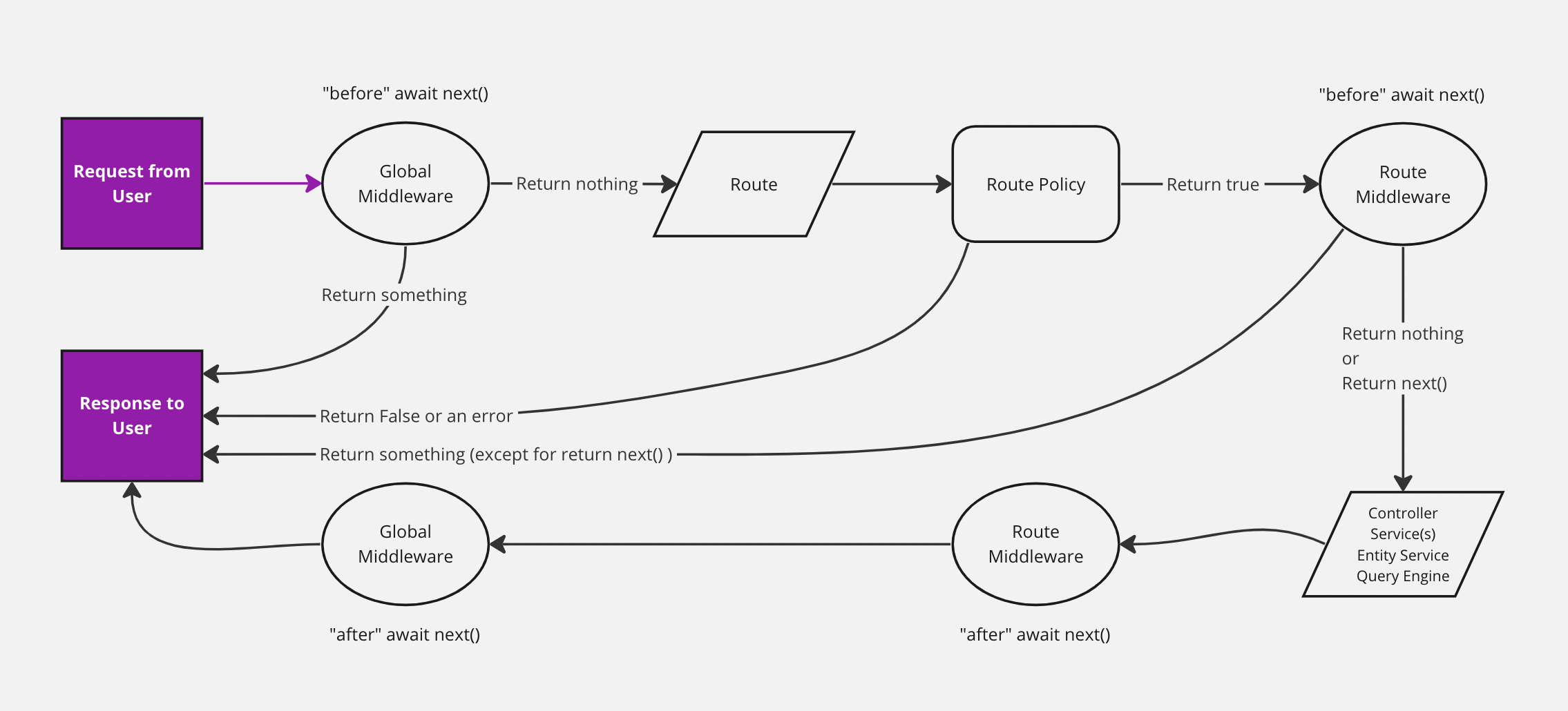
Figure 1: Graphical representation of the Strapi request flow (linked directly from Strapi docs ).
Request: A request is initiated when a user (e.g. website frontend or API consumer) sends an HTTP request to the Strapi server (e.g. GET
/api/members).Middleware Before reaching the custom logic, the request passes through middlewares, which can handle tasks like CORS, logging, authentication, or modifying the request/response. Strapi includes both global and route-specific middleware.
Routes Routes define how Strapi maps incoming requests to controllers. They are configured in each content-type or custom API (e.g.
routes/posts.js) and specify the HTTP method, path, and controller action to invoke.Controllers Controllers handle the logic for incoming requests. They are the "gatekeepers" that receive the request, process it, and return a response. Controllers can be customized or extended beyond the default logic generated by Strapi.
Services Services encapsulate reusable business logic or database operations. Controllers often call services to perform actions like fetching, updating, or validating data. This separation keeps controllers clean and maintains DRY principles.
Example Flow:
- A GET
/api/membersrequest is received. - Global middleware (e.g. authentication) checks permissions.
- The request hits the matching route.
- The controller method for
findis triggered. - The controller calls a service to fetch data from the database.
- The controller sends the response back to the client.
As every node.js project Strapi is bound to a structured and rigid project scaffold, an exemplary view is shown in the structure below:
.
├── 📁 config/               # Configuration files for Strapi setup and services
│  ├── 📄 admin.js           # Admin panel configuration
│  ├── 📄 api.js             # API setup and config
│  ├── 📄 cron-tasks.js      # Scheduled jobs configuration
│  ├── 📄 database.js        # Database connection and settings
│  ├── 📄 middlewares.js     # Middleware configuration
│  ├── 📄 plugins.js         # Plugins configuration
│  └── 📄 server.js          # Server setup and startup logic
├── 📁 database/             # Database-related files
│  └── 📁 migrations/        # Database migration scripts
├── 📁 public/               # Publicly accessible files served by the app
│  ├── 📄 robots.txt         # Web crawler instructions
│  └── 📁 uploads/           # Uploaded files storage
├── 📁 scripts/              # Documentation, utility and export scripts
├── 📁 src/                  # Source code for frontend and backend
│  ├── 📁 admin/             # Admin panel related code
│  │  ├── 📄 app.js
│  │  ├── 📁 extensions/
│  │  ├── 📁 pages/
│  │  └── 📄 vite.config.example.js
│  ├── 📁 api/               # API collection types and endpoints
│  │  ├── 📁 about-page/
│  │  ├── 📁 ...
│  │  └── 📁 member/         # Member API with detailed structure
│  │     ├── 📁 content-types/  # Data schema and lifecycle handlers for member
│  │     │  └── 📁 member/
│  │     │     ├── 📄 lifecycles.js  # Member lifecycle hooks
│  │     │     └── 📄 schema.json    # Member content type JSON schema
│  │     ├── 📁 controllers/    # Member API request handlers
│  │     │  ├── 📄 actualruns.js # Actual runs controller for member-related logic
│  │     │  ├── 📄 member.js     # Member main controller (CRUD and logic)
│  │     │  └── 📄 signin.js     # Member sign-in controller
│  │     ├── 📁 routes/         # Member API routes
│  │     │  ├── 📄 01-custom-routes.js # Custom routes for member
│  │     │  └── 📄 02-core-routes.js   # Core routes for member
│  │     └── 📁 services/       # Business logic for member
│  │        ├── 📄 member.js     # Member service functions
│  │        └── 📄 signin.js     # Sign-in related services
│  │  ├── 📁 ...
│  │  └── 📁 tshirtsize/
│  ├── 📁 components/           # Reusable UI component (not used)
│  ├── 📁 controllers/
│  │  ├── 📄 metabase-token.js
│  │  └── 📄 ping.js
│  ├── 📁 extensions/           # Project-specific Strapi extensions
│  ├── 📄 index.js              # Main entry point for the source code
│  └── 📁 routes/
│     └── 📄 metabase-token.js
└── 📁 types/                   # Type files auto-generated by Strapi
Figure 2: Simplified project folder structure for the Strapi backend.
For the project we need to look only in four (groups) of folders:
📁
config/: includes all configuration files for Strapi. Details can be found here📁
api/collectionName: for each database table (Collection Types, Single Types and Components, see here) created in the Admin Panel a sub-folder structure is created in theapifolder. The data schema is always present atapi/collectionName/content-types/collectionName/schema.json. If lifecycles are required (optional) they must be implemented in the same directory aslifecycles.js. For optional Services targeting a Collection:- a Route can be setup in the
api/collectionName/routesfolder (the Strapi recommendation is to setup a separate route file sorted before the standard routes, as route files in this folder are executed in order), - a Controller is created in
api/collectionName/controllers - and the related Services file is created in
api/collectioName/services.
- a Route can be setup in the
📁
controllersandroutes: these folders are targeting the implementation of data independent routes/services.📁
adminand subdirectories: this is where changes to the Admin Panel are implemented. In this project this is used to create the Custom Welcome Page