
Documentation
Vitepress
This documentation is built using Vitepress a Static Site Generator (SSG) for building fast content-centric websites based on Markdown files.
To keep the documentation concise, all files are stored in the Parent Repo's docs folder and its subdirectories; only references to this documentation are stored in the individual repositories. Vitepress itself is also installed in the docs folder and its configuration can be found in docs/.vitepress/config.mjs. The configuration (excluding the sidebar setup) is shown below:
base: '/',
ignoreDeadLinks: true,
title: "KLH3 Website",
description: "The complete documentation for the rebuild of the KL Hash House Harriettes website. Covers the backend, the frontend and the server-setup, including the installation and deployment processes",
vite: {
  server: {
    fs: {
      allow: [
        '../frontend/',
        '../backend/',
      ],
    },
  },
},
themeConfig: {
  lang: 'en-US',
  search: {
    provider: 'local'
  },
  title: "KLH3 Website documentation",
  footer: {
    message: 'Released under the MIT License.',
    copyright: 'Copyright © 2025 KLH3 Thomas Roch'
  },
  logo: '/bunny_pink.png',
  nav: [
    { text: 'Home', link: '/' },
    { text: 'Architecture', link: '/architecture/' },
    { text: 'Server Setup', link: '/server-setup/' },
    { text: 'Frontend', link: '/frontend/' },
    { text: 'Backend', link: '/backend/' }
  ],
  socialLinks: [
    { icon: 'github', link: 'https://github.com/klharrier/klhhh' }
  ],
Minor theming adaptions (mainly colors) for Vitepress were made in docs/.vitepress/theme/style.css
Deployment through cloudflare Worker
This documentation is served using another cloudflare Worker to avoid setting up/consuming additional server hardware.
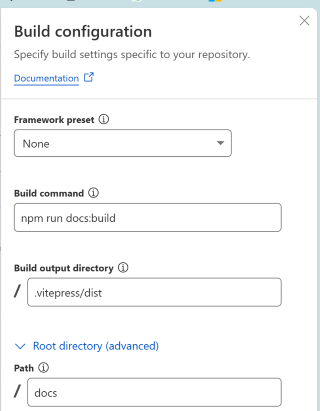
The worker klhhh-docs is connected to the Parent Repo GitHub repository and within that to the main branch. The configuration uses npm run docs:build as Build Command and must be configured to use docs as the root directory. The documentation website is automatically rebuilt with every commit to the respective repository and branch and connected to docs.klharriettes.org.
TIP
Using yarn as package manager - the common standard throughout this project - created issues during the automated build process of the worker, hence npm had to be used
In order not to offer a pathway into an obvious attack vector to any intruders the documentation is protected with a simple HTTP authentication implemented by another cloudflare Worker docs-auth
export default {
  async fetch(request, env) {
    const REALM = "Protected Documentation Area";
    const USERNAME = env.USERNAME;
    const PASSWORD = env.PASSWORD;

    // Get Authorization header
    const auth = request.headers.get("Authorization");

    // If no auth header, ask for credentials
    if (!auth) {
      return unauthorizedResponse(REALM);
    }

    // Basic auth format: "Basic base64encoded(username:password)"
    const [scheme, encoded] = auth.split(" ");

    if (scheme !== "Basic" || !encoded) {
      return unauthorizedResponse(REALM);
    }

    // Decode base64 credentials
    let decoded;
    try {
      decoded = atob(encoded);
    } catch {
      return unauthorizedResponse(REALM);
    }

    const [user, pass] = decoded.split(":");

    // Check credentials
    if (user !== USERNAME || pass !== PASSWORD) {
      return unauthorizedResponse(REALM);
    }

    // Credentials valid — proxy the request
    return fetch(request);
  }
};

function unauthorizedResponse(realm) {
  return new Response("Unauthorized", {
    status: 401,
    headers: {
      "WWW-Authenticate": `Basic realm="${realm}"`,
      "Content-Type": "text/plain",
    },
  });
}
Style Guide
Each main section is structured in folders. Each folder contains (an index.md with - if required - a few introductory sentences and a Table of contents (TOC)
Sidebars (and TOC) provides links down to file level. Each file starts with a Level 1 header (#) so that the sub-structure of each file is visible in the On this page section
Automated Creation
Where possible the creation of technical documentation for frontend and backend components was implemented using node scripts (in the respective ./scripts folder as generate[...]Docs.js).
The frontend scripts are generating the .md files and folders directly where required in the docs, for the backend the folders/files are created in the ./scripts folder itself and must be copied to their target location in the docs
All generator scripts support single documentation file creation by adding the entity/file name as a command line parameter
WARNING
All generator scripts have been created without adhering to good coding standards, documentation etc. and need a certain "attention" 🥸
Within code files the JsDocs were created using the AI-supported Windsurf VS-Code Extension with little adjustments.