
SellItem.vue
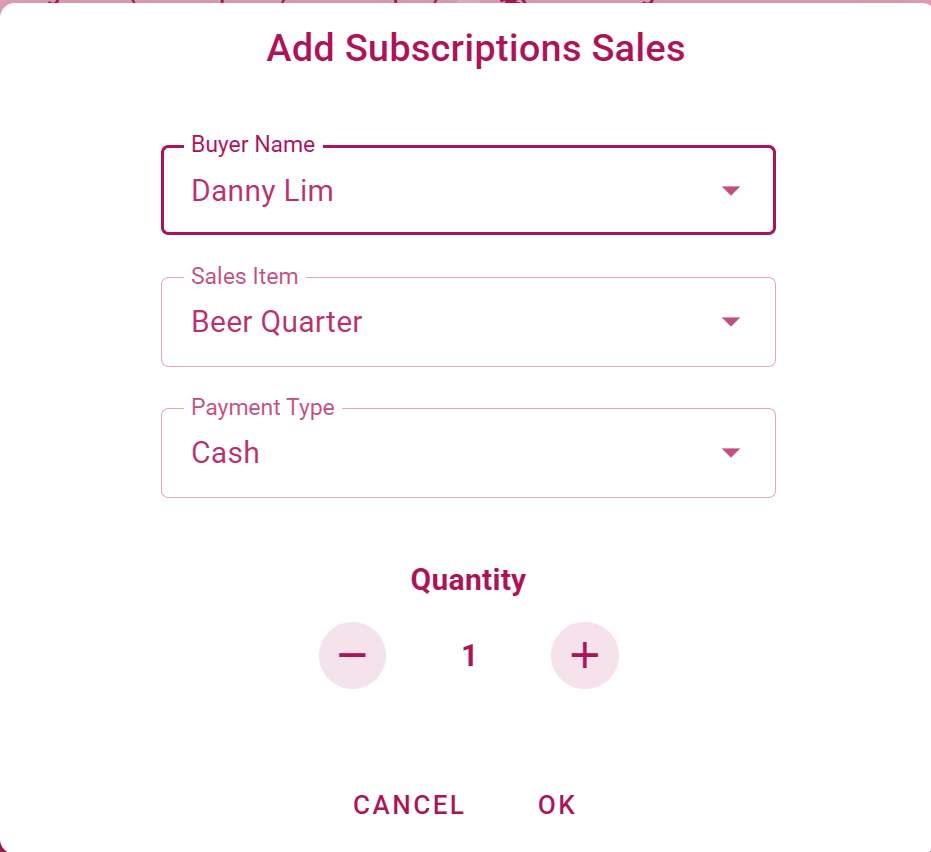
This component renders the Sell Item dialog. It dynamically changes the buyer selection list and items to be sold depending on the itemType prop (Subscriptions or Drinks).
Props
| Name | Type | Required | Default |
|---|---|---|---|
itemType | String | ✅ | 'Subscriptions' |
Emits
update:modelValue
Used by
Used Stores
Functions
openQuantityDialog
Store the current quantity before opening the Edit Quantity sub-dialog
Info: Not used anywhere?
closeQuantityDialog
Resets the quantity to its original value before closing the Edit Quantity sub-dialog and closes the quantity dialog.
closeRegisterDialog
Resets the form and closes the dialog. Emits an event to update the modelValue prop to false (tell the parent to close the dialog), resets the form and its validation state, and resets all form fields to their default values.
submitNewSalesItem
Submits a new sales item by creating a new entry in the onsite sales store (via the createOnsiteSalesEntry action), and displays a snackbar with the result (success or error).
incrementNumber
Increments the quantity of the new sales item, required for the +/- buttons in the dialog
decrementNumber
Decrements the quantity of the new sales item, required for the +/- buttons in the dialog
Reactivity
minQuantity (computed)
Confines the minimal quantity which can be sold to 1 for subscriptions and 1 for drinks
maxQuantity (computed)
Confines the maximum quantity which can be sold to 3 for subscriptions and 24 for drinks
isQuantityValid (computed)
Checks if the quantity is within the valid range
buyersForItem (computed)
Returns the list of buyers for the selected item type, i.e. Guest & Members for Drinks and Members only for Subscriptions
(anonymous) (watch)
Reset the form and its validation state when the itemType prop changes, e.g. when switching between Subscriptions and Drinks
(anonymous) (watch)
A bit complicated logic to filter available sales items based on buyer's member type (Beer or Non-Beer) and sales_item type. Only relevant for Subscriptions, Drinks are passed through
Parameters:
buyer: - the selected buyer object
(anonymous) (watch)
Pre-selects and sets the payment type to 'Cash' when the dialog is opened
(anonymous) (watch)
Sets the default sales item after the buyer is selected for Subscriptions and drinks. Suboptimal because items are picked by their sequence in the sales-item array