
Introduction
Vue.js App
The frontend is build using Vue.js supported by the Vuetify component framework plugin. Vue.js is creating a so-called Single-Page-Application (SPA), where only a single file (index.html) is actually loaded, and subsequently mounts the website in a so-called virtual DOM (Domain Object Model) into the browser's memory using javascript files. The Vuetify plugin provides a broad variety of customizable standard components and so-called Utility first CSS classes which provide easy to use classes for standard CSS tasks (text-sizes, @media setups, colors, etc.) on top of Vue.js.
A typical Vue.js/Vuetify project uses a standardized scaffold of directories and files. Figure 1 shows this scaffold and Figure 2 who a SPA is loaded. The following list summarizes the use of the elements (non-standard elements highlighted in bold):
🟥
index.htmlis the entry point bootstrapping the Vue.js.app - the single page in SPA. It- loads the javascript bundle through
main.js - provides the initial HTML structure
- mounts the Vue.js into the DOM.
- loads the javascript bundle through
🟨
src/main.js: the entry for the Vue.js app.- Imports Vue (
createApp) - Imports
App.vue, which is the root component - loads up plugins (in our case including Vuetify)
- Mounts the Vue app to the DOM
- Imports Vue (
🟩
src/App.vue: is typically the root Single-File-Component (SFC) containing the main layout, such as the toolbar, drawer, androuter-viewwhere routed pages load. Withrouter-viewwe can load and setup pages.📁
src/pluginsdirectory contains the Vue.js plugins configuration. Plugins are loaded throughmain.jsbut registered through anindex.jsfile in the plugins' folder. Individual plugins (like Vuetify) can require their own configuration file here.⚙️
src/plugins/vuetify.jsis the file configuring the Vuetify plugin. Most of the application's design like colors and own component styles are implemented here.⚙️
src/styles/settings.cssallows overwriting/adding Vuetify SCSS variables. Only used to set up some convenience classes in this project.📁
src/layoutsdirectory contains Layouts which are a Vuetify specific implementation convention. They are used providing templates which should be available on multiple pages; to make the website flexible and dynamic, multiple layouts can be defined and used on different pages.📁
src/pagesdirectory contains the.vuefiles implementing the route endpoints of the website and set up single websites with respective content📁
src/componentsdirectory contains all Single File Components (SFC) which implement re-usable UI elements📁
src/storesStores are states (the data that represents the current condition or values of the app or a component, basically the “source of truth” that the UI reacts to and displays) which can be used across the entire Vue.js app and can (and are) often persisted inindexedDB. In this project Pinia stores are used. It is common practice that eachStore.jsfile implements a single store for a certain purpose.⚙️
src/router/index.jsallows configuring routes manually if required. In this project only the re-routing to the 404 page is added here.📁
publicdirectory contains static files that are not processed or bundled by the build tool. Files here are copied as-is to the root of the final build (dist/).📁
src/assetsFor processed, bundled assets used in Vue.js components. Handled by the module bundler (Vite) and integrated into the components during build.📁
src/utils(often alsocomposable) directory contains javascript modules implementing supporting functions re-used by other modules or which are outsourced to contain the file size ofcomponents,pagesorstores📁
scriptsdirectory is not part of the standard setup and contains node scripts to generate this documentation automatically forpages,components,stores, andutils⚙️
vite.config.mjsis the configuration file for the standard build tool/development server Vite (see below). Changes some settings mainly to set up the Progressive Web App.⚙️
vue.config.jsis the configuration file for Vue.js itself. Not in use in this project.
.
├── 📁 public             # Static public assets (served as-is)
├── 📁 scripts            # Scripts for documentation (**non-standard**)
├── 📁 src                # Source files
│   ├── 📁 assets         # Static assets like images, fonts, etc.
│   ├── 📁 components     # Vue components
│   ├── 📁 layouts        # Application layout wrappers
│   ├── 📁 pages          # View-level components (page routes)
│   ├── 📁 plugins        # Plugins for Vue/Vuetify setup
│   │   ├── ⚙️  vuetify.js
│   │   └── ⚙️  index.js
│   ├── 📁 router         # Vue Router config
│   │   └── ⚙️  index.js
│   ├── 📁 stores         # Pinia stores (state management)
│   ├── 📁 styles         # Global and shared styles
│   │   └── 🎨 settings.css
│   ├── 📁 utils          # Utility/helper functions (**non-standard**)
│   ├── 🟩 App.vue        # Root Vue Single File Component (SFC)
│   └── 🟨 main.js        # JS entry point, mounts the app
├── 🟥 index.html         # HTML entry point (SPA shell)
├── ⚙️  vite.config.mjs   # Vite config (ES module)
└── ⚙️  vue.config.js     # Vue config (CommonJS)
Figure 1: The project structure /folder scaffold of the KLH3 website project
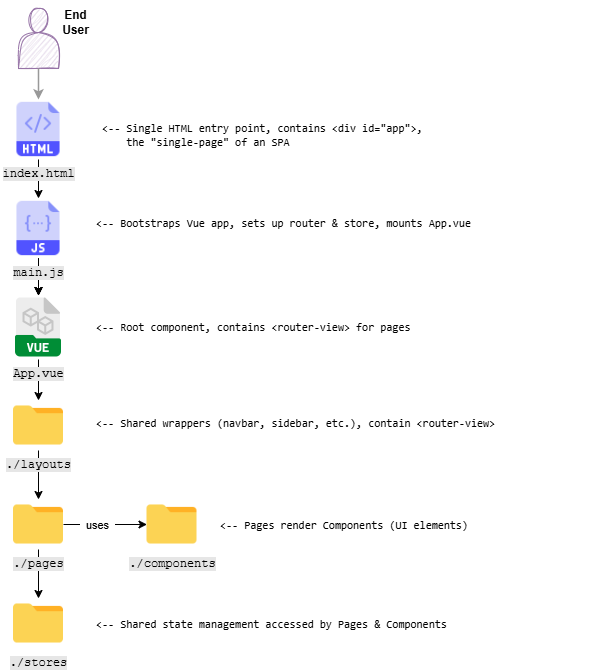
Figure 2: A graphical representation of the relationship between Vue.js main building blocks.
The application (website) needs to be built using Vite (the standard build tool for Vuetify projects).
INFO
Vite is a build tool and development server designed for modern frontend projects (like Vue.js, React, etc.):
- It provides a fast development server with hot module replacement (HMR) so changes are instantly visible while coding.
- It builds/compiles projects for production, optimizing and bundling the constituting files.
During the build process the following steps are accomplished by Vite:
- Vue.js files (.vue) are compiled into javaScript (template → render function).
- JavaScript and TypeScript files are bundled together.
- CSS (including Utility Classes, Sass, etc.) is extracted and optimized.
- Assets (images, fonts, etc.) are hashed and copied to the output folder.
- The resulting code is optimized for production by:
- Minification: Code is stripped of spaces, comments, etc. via
esbuild. - Tree shaking: Unused code is removed.
- Code splitting: Large files are broken into chunks that can be lazy-loaded.
- Asset hashing: File names include a content hash (e.g., main.abc123.js) for better caching.
- Minification: Code is stripped of spaces, comments, etc. via
The final output (the target for the Webserver, e.g., nginx) is stored in the /distdirectory of the project folder.
Progressive Web App (PWA)
A Progressive Web App is a web application that behaves like a (native) mobile app. It works in a browser but can also be:
- Installed on a device’s home screen
- Used offline or with poor network thanks to caching
- Fast and reliable
- Able to send push notifications
For the technical details a useful e-learning is provided here
Vue.js provides PWA capabilities out of the box. To run the PWA properly and especially to support the offline functionality of the Sign-In App a fair bit of additional configuration is however required. The extended capabilities are injected during the application build process by Vite.
The configuration for the PWA needs to be implemented in vite.config.mjs (for details see configuration)
As we require offline functionality (which doesn't work with Vue.js out-of-the-box PWA functionality) the setup and use of a Service Worker is compulsory. A Service Worker is a script that a browser runs in the background, separate from the web page. It acts like a programmable network proxy between the web app, the browser, and the network. It:
- Intercepts network requests and decides how to respond (e.g., from cache or network)
- Enables offline support by caching assets and API responses
- Handles push notifications
- Perform background sync (retrying failed network requests when back online)
The Service Worker is programmed low-level close to the browser and hence rather difficult to handle in day to day programming. Google has introduced the concept and code of a Workbox which is a set of JavaScript libraries and tools that helps to easily add offline support and advanced caching to PWAs by simplifying the creation of Service Workers. A Workbox automates common service worker tasks like (for an overview of caches see Figure 6):
- Precaching files
- Runtime caching strategies
- Background sync
- Routing requests
Offline Functionality
Why and how
Hash runsites are often rather remote and not necessarily have internet coverage. Although there is a paper version of the Sign-In App which could be used at the runsite to transfer data into the backend later, an offline functionality was implemented.
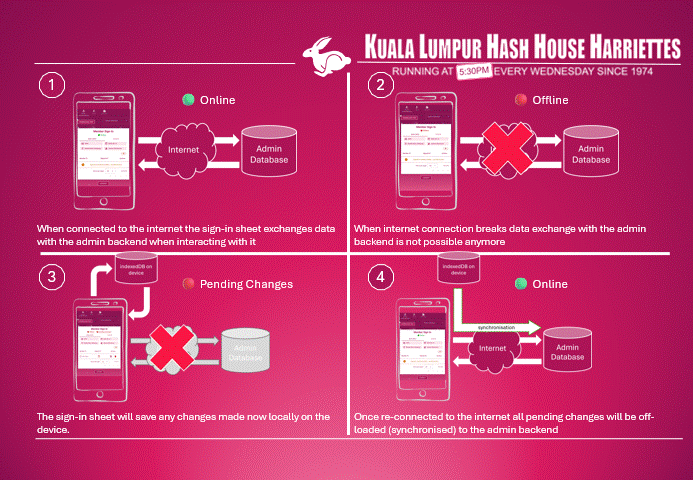
Figure 3: High-Level overview of offline functionality
Figure 3 shows the high-level principle of the offline functionality:
- As long as the device is online, all transactions are persisted directly in the backend database.
- If the internet breaks all transactions must be:
- If the device gets online again, all task queues must be processed, i.e., the transactions which are only locally available in the task queue must be executed against the database.
Challenges
This generic process poses some challenges to the design and implementation of such a functionality:
The detection of the online/offline status of a mobile device is tricky. Although there is an API (
navigator.online) for modern browsers, this is not reliable, particularly on cellular devices. To safely detect the network status, a/pingendpoint was implemented in the backend and is called periodicallyDatabase keys are missing. When online, the interaction with the backend database often returns unique keys/Ids - especially for
createprocesses - which are required for downstream processes.Example: if we create a member registration at the runsite and we want to sign-in the member in after the run, we need the
record idof the registration entry to update the respective record.When there is no internet connectivity, these keys/Ids can not be fetched, so that we have to implement a local "accounting system" with temporary unique local keys/ids to relate consecutive transactions.
Tasks and sometimes even processes must be executed in a strict order. After getting online again, the task queue has to be executed in strict order and the temporary local keys/Ids must be related to/replaced with the database
record idof the executed transactions.Example: we have created as described in the example above, a member registration and after the run we signed the member in - all without internet connection. When getting online again, the task to create the member registration has to be executed first against the backend database, and returns the "real"
record id. The update transaction which is still queued, needs to "know" thisrecord idbefore being executed. We have to replace the local key with the "real"record id.This is even more complicated for guests, when a guest record is added at the runsite. We have to create the guest record first, then the related guest registration and then update this registration after the guest returned from the run, all in correct sequence, and for all steps replacing Ids.
Sync process is interrupted by another network loss. With shaky internet connections of a cellular device it must be anticipated that the task queue execution is interrupted by another outage. Moreover, the network transport is by far the most time-consuming step, hence the process of
send request to backend -> database operation -> receive response
is likely interrupted during waiting for a response from the backend database.
This is not much of a problem for a
PUTorDELETErequest, but when creating a new record using aPOSTrequest it poses a problem.Of course not finished
createtasks are re-queued and executed once the network connection is stable again, but if thePOSTrequest was already send and executed by the database backend and only the response was not received, the database backend will return an error (often a duplicate entry error).To solve this an Idempotency key needs to be introduced. Idempotency means that when the same question is asked the exact same answer is returned - which for
POSTrequests is as a standard not true. In the example, the firstPOSTrequest has already created the record but the first response (the creation confirmation) got lost. If the same question (POSTrequest) is asked again, the answer is different (e.g., an error message).Technically this issue is solved by creating and sending a unique
X-Idempotency-Keywith eachPOSTrequest in the header. The backend database stores this key together with the record created in a separate table, and when aPOSTrequest with the sameX-Idempotency-Keyis received, the response will not be an error message but the created record as in the first request. This response behavior must be implemented separately in the Strapi backend. Also, the Strapi CORS configuration must be changed to allow this key in the header of a request (see CORS config).
Technical building Blocks of offline functionality
The functionality is implemented in stores and utility functions.
Although three different processes were implemented to work offline:
- register and manage members
- add, register and manage guest including payments
- manage onsite sales of drinks and onsite payment of subscription fees
the structure is similar for all. It always includes the following functional blocks:
thisRunsStore(Store) provides the basics of the actual run like therunDateand theharePasswordconnectivityStore(Store) monitors and provides the actual network status and also checks if in any of the task queues are pending taskssyncQueueManager(Util) creates a registry for all task queues and provides a functionality to register a queue to it. It also provides the execution function for all task queues.usePersistentStore(Util) abstracts all interactions with the localindexedDBby providing methods to get and read complete queue instances as well as methods to add, remove and update tasks in a specific queue.- A data store for the object which is managed by the respective process (
signInMemberStore,signInGuestsStore,onsiteSalesStore). Each store contains the 🟢 Online methods for all transactions required to support the process, and each of these methods also has an 🔴 Offline fallback function which enqueues the transaction as a task to the queue and updates and persists the store data locally. Additionally, each store implements aprocessQueuefunction which is registered in the task queue registry and - after getting online again - executed bysynQueueManagermethods.
The following diagram shows these building blocks and their relationships for the signInMemberStore.
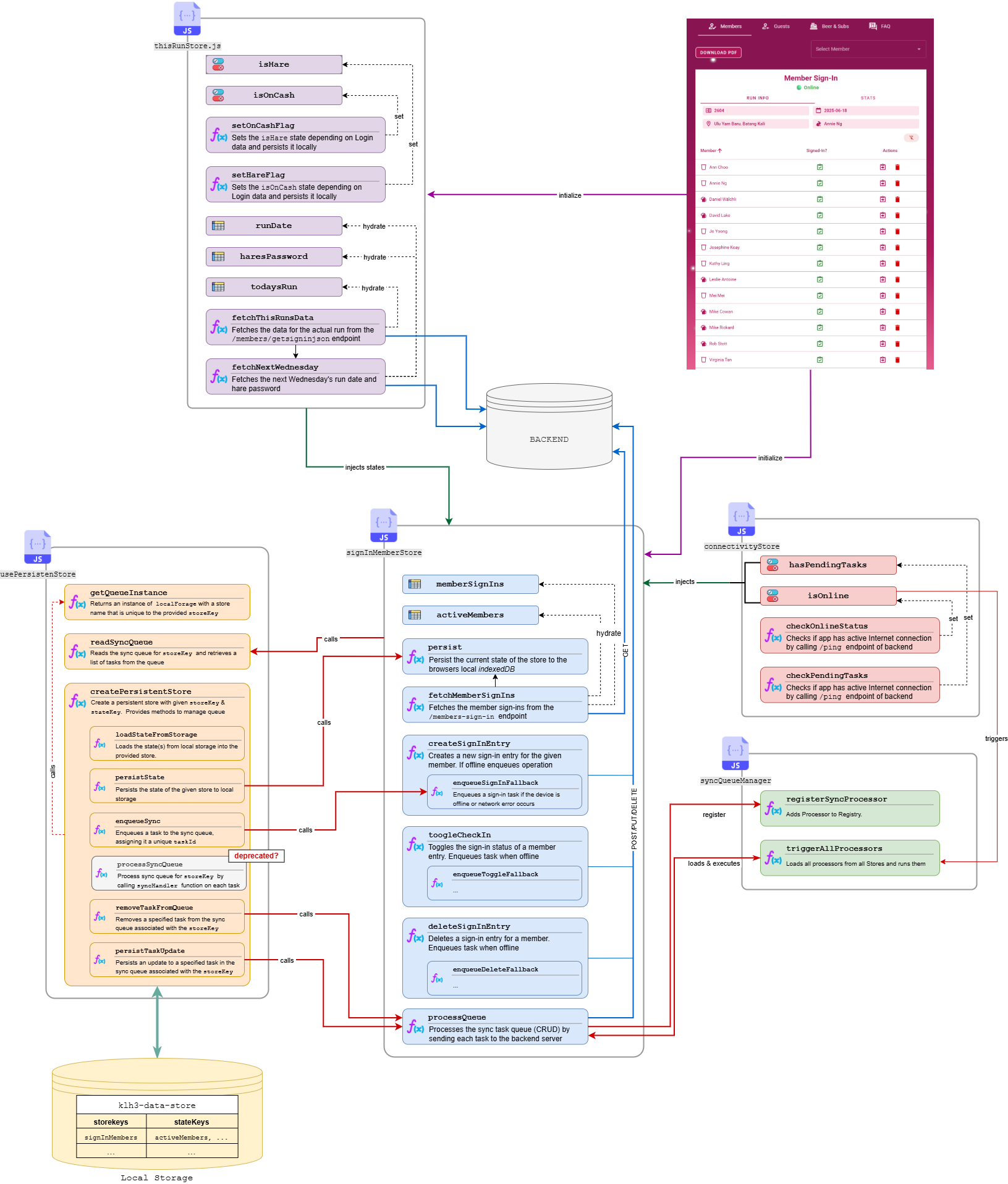
Figure 4: Functional blocks implementing the offline functionality and their relationships. An online version can be viewed here
Sequence diagram
The following Figure 5 provides further details about the interaction of the components by showing the - simplified - sequence diagram using the example of the member registration process again.
---
title: Offline process
config:
    theme: base
    themeVariables:
        noteBkgColor: '#AD1457'
        primaryTextColor: '#AD1457'
        secondaryTextColor: '#FFFFFF'
        noteTextColor: '#FFFFFF'
        primaryColor: '#FCE4EC'
        lineColor: '#AD1457'
        background: '#FFFFFF'
---
sequenceDiagram
    box App Lifecycle
        participant V as Vue Component
    end

    box Stores
        participant C as useConnectivityStore
        participant T as useThisRunStore
        participant M as useSignInMembersStore
    end

    box Utility
        participant P as usePersistentStore
        participant Q as syncQueueManager
    end

    box Backend
        participant B as Backend API
    end
    box Localstorage
        participant L as indexedDB
    end

    %% Initialization of connectivity
    Note over C,B: Check connectivity and task Queue
    C->>B: call `/ping`endpoint
    activate B
    alt Online
        B-->>C: return HEAD
        deactivate B
        C->>C: `isOnline` = true
    C->>C: `isOnline` = false
    end
    C->>P: call `readSyncQueue`
    activate P
    P->>P: call `getQueueInstance`
    P<<->>L: get items
    alt Queue instance has tasks
        P->>C: return 1
        C->>C: `hasPendingTasks` = true
    else Queue instance empty
        P-->>C: return 0
        deactivate P
        C->>C: `hasPendingTasks`= false
    end
    %% Initialization
    Note over V: Initialize Page
    V->>C: Check isOnline & hasPendingSyncTasks
    alt Online
        V->>T: initializeThisRunsStore({ skipFetch: false })
        T->>B: fetch `hash` table data
        activate B
        B-->>T: return data
        deactivate B
        V->>M: initializeMemberSignInStore({ skipFetch: false })
        M->>B: fetch `member` data
        activate B
        B-->>M: return Data
        deactivate B
    else Offline or PendingTasks
        V->>T: initializeThisRunsStore({ skipFetch: true })
        T->>L: fetch persisted `thisRun`data
        activate L
        L-->>T: return data
        deactivate L
        V->>M: initializeMemberSignInStore({ skipFetch: true })
        T->>L: fetch persisted `memberSignIn`data
        activate L
        L-->>T: return data
        deactivate L
    end

    %% Event triggered (sign-in)
    Note over V: User triggers member registration

    alt Online
        M->>B: POST `/members-sign-ins`
        B-->>M: Success
        M->>P: persist()
        P->>L: persistState()
    else Offline or Network error
        M->>P: enqueueSignInFallbackSync({ type: create, ... })
        P->>L: enqueueSync()
        M->>L: Push registration to local state
        C->>C: setTasksPending()
    end

    %% Network comes online
    Note over C,Q: Network restored

    C->>Q: triggerAllProcessors()
    Q->>M: return processQueue() function
    Note over Q: collects all processors and sorts them
    Q->>Q: trigger Processor execution

    %% Sync Queue Processing
    M->>M: sort Tasks (creation first)
    loop All queued Tasks
    alt Queue includes "create"
        M->>B: POST registration w/ idempotency key
        B-->>M: Respond with real documentId
        M->>P: persistTaskUpdate(related tasks)
        P->>L: update local Task
        M->>P: removeTaskFromQueue()
        P->>L: remove from local Task Queue
    end
    alt Queue includes "toggle" or "delete"
        M->>B: PUT/DELETE w/ updated documentId
        B-->>M: Success
        M->>P: removeTaskFromQueue()
        P->>L: remove from local Task Queue
    end
    end

    Q->>C: setPendingTasksCleared()
Figure 5 Sequence Diagram of the member registration process (simplified). Use the function bar at the bottom to enlarge and for full-screen view
TIP
The mermaid renderer provided by the vitepress-mermaid-renderer is excellent but a bit tricky to use. Make sure to zoom in/out accordingly before going to fullscreen mode. When panning, the entire diagram occasionally vanishes - use the Reset view button to get back to start.
Caching
Caching is a major challenge in a PWA - the app has to ensure that as much content as possible is cached (and stored locally in indexedDB) to allow the app to work offline, but important files are not cached at all to allow easy refresh.
During frontend development it turned out that "cache freshness" is an important parameter for a PWA. To inform the end user about the up-to-dateness of the data he/she is viewing when being offline is a key requirement for a PWA. The determination when a particular cache or even request was last loaded from the backend is in principle available as part of the workbox (see below) - but not readily accessible. In consequence an additional header X-Cached-Atis added by the backend to each response. Regarding the implementation details see here
Figure 6 shows a schematic diagram of the caches involved in most modern websites:

Figure 6: Schematic diagram of the caches involved in an HTTP request. Service Worker cache is only utilized if implemented through a Progressive Web App (PWA). Files which should not be cached must have the respective headers and cloudflare bypass caching rule applied.
1️⃣ Browser Cache
- What it is: The traditional HTTP cache managed by the browser.
- How it works: The browser caches files (HTML, JS, images) based on HTTP headers (
Cache-Control,Expires,Etag), regardless of any service worker. - Scope: All website requests that the browser knows about.
- Best for: Leveraging HTTP caching semantics, quick revalidation of unchanged files.
2️⃣ Precache (Service Worker/Workbox)
- What it is: A cache that’s populated at service worker installation (using tools like Workbox).
- How it works: Specific files listed in a precache manifest are downloaded and stored when the service worker is installed. These files can be served instantly, regardless of network status. In the Vite build process for the Vue.js app the precache manifest is generated automatically by the process itself, triggered by the vitePWA plugin.
- Scope: Defined by the service worker, applies only to files listed.
- Best for: App shell files, critical assets required for offline support. In a Vue.js build, e.g., all (minified) components are stored here.
3️⃣ Runtime Cache (Service Worker/Workbox)
- What it is: A cache that operates as the app is used. It stores requests/responses on-the-fly.
- How it works: When requests occur, the service worker applies a caching strategy (e.g., cache-first, network-first, stale-while-revalidate), saves results to a cache, and serves them later.
- Scope: Defined by developer code (and caching strategies).
- Best for: Frequently requested assets or API responses that aren't in the precache.
5️⃣ cloudflare Cache (or other CDN Caches)
- What it is: A (cloudflare) server-side caching layer (Content Delivery Network, CDN).
- How it works: Requests made by the browser are first intercepted by the CDN. Frequently requested files (HTML, JS, images) are stored in edge locations closer to end-users. As cloudflare operates a CDN running hundreds of servers globally, this cache is regional - files are cached on a server close to the user - and can reduce network latency significantly.
- Scope: After the browser and before the origin server.
- Best for: Offloading requests from the origin server, reducing latency, and providing quick access to static resources.
indexedDBis another element where data can be persisted - it stores data locally then only needs to be requested once. Is it a cache? Not in the traditional sense. It's a database used for offline storage, state persistence, and structured data. It is complementary to caching.
5️⃣ indexedDB
- What it is: A structured database stored in the browser, distinct from traditional caching.
- How it works: Enables developers to save data (such as JSON or structured data) in a schema, making it retrievable and searchable.
- Best for: Storing user data, offline-first databases, application state, or data that doesn’t fit a simple request–response cache model.
The interaction between the different caches is depicted on a higher-level in Figure 6 and in more detail in Figure 7:
A request from the user hits the HTTP Cache (Browser cache) first, if no service worker is installed. Only if the HTTP Cache cannot serve the requested file, the request is forwarded to the Edge Cache of cloudflare. If the file is also not found here, the request is forwarded to the server.
With a service worker installed, the initial request is intercepted by the service worker first. The service worker checks its own caches (precache and runtime cache) first, before forwarding to the HTTP Cache. From there the sequence continues as described above.
For some files it is important that always the actual, latest version is served (e.g., service worker.js) - in this case the HEADER of the HTTP request needs to be modified to inform the browser (and the service worker) that it should pass the request without looking up the caches (for the related Nginx configuration see here). Similarly, the cloudflare Edge Cache needs to know that these files must be requested at all times directly from the server and bypass cloudflare's cache. For implementation details see cloudflare setup
CLEARING CACHES
Stale or outdated caches lead to significant problems in an application and makes the developers' life difficult. It is hence recommended clearing caches often and especially the cloudflare cache for every new version.
Still, when deploying a new version a page reload is mandatory especially for the PWA installed on a mobile device to update the service worker. Although this page reload is automatically injected by the VitePWA plugin, sometimes a new version is not reliably updated. If (multiple) page reloads do not solve the issue, the browser cache/data must be cleared manually; this deletes all - local - caches and also the indexedDB.
TIP
To detect if the load of a new version was successful, a version timestamp is automatically injected during application build and can be viewed by clicking on the image of the Webmaster in the About Us -> Committee page.
---
title: Cache request flow
config:
    theme: base
    themeVariables:
        noteBkgColor: '#AD1457'
        primaryTextColor: '#AD1457'
        secondaryTextColor: '#FFFFFF'
        noteTextColor: '#FFFFFF'
        primaryColor: '#FCE4EC'
        lineColor: '#AD1457'
        background: '#FFFFFF'
---
flowchart TD
    A[Request from Page] --> B[Service Worker Registered?]
    B -- No --> C[Browser HTTP Cache -> Network]
    B -- Yes --> D[Service Worker Intercepts?]

    D -- No --> C
    D -- Yes --> E[Check Service Worker Cache]
    E -- Found --> F[Return from Service Worker Cache]
    E -- Not Found --> G[Fetch from Network]

    G --> H[Check HTTP Cache]
    H -- Found --> I[Return from HTTP Cache]
    H -- Not Found --> J[Go to Origin/CDN]
    J --> K[Response received]

    K --> L{Service Worker Policy?}
    L -- Precache --> M[Save to Service Worker Cache]
    L -- Runtime Caching --> N[Optionally Save to Service Worker Cache]
    L -- Do Not Cache --> O[Return as is]
Figure 7 Cache request flow