
Deployment Process
The deployment process is built around the principle that production servers never build, install, or pull source code. All compilation happens on the staging server; only the finished Docker image travels to production.
Why this matters
The April 2026 security incident was caused by running yarn install on the production server. A malicious npm postinstall script gained root access via the Docker socket. The new process eliminates this attack vector entirely — production never touches npm packages.
Architecture Overview
---
title: Server Roles
config:
    look: handDrawn
---
flowchart TD

classDef staging fill:#BBDEFB,stroke:#1E88E5,stroke-width:2px
classDef prod fill:#A5D6A7,stroke:#43A047,stroke-width:2px

subgraph STAGING ["🔵 Staging Server (klhhh-staging)"]
  direction LR
  SR1["Git repositories<br/>(backend + frontend)"]:::staging
  SR2["Docker build environment"]:::staging
  SR3["Image mode testing<br/>(docker-compose.yml)"]:::staging
  SR4["Image transfer to prod<br/>(docker save | gzip | ssh | docker load)"]:::staging
end

subgraph PROD ["🟢 Production Server (klhhh-prod)"]
  direction LR
  PR1["Pre-built Docker images<br/>(klhhh-strapi:latest<br/>klhhh-frontend:latest)"]:::prod
  PR2["docker-compose.yml<br/>+ .env (secrets)"]:::prod
  PR3["Running containers"]:::prod
end

STAGING -->|"SSH image transfer — port 8288"| PROD

style STAGING fill:#E3F2FD,stroke:#1E88E5,stroke-width:3px
style PROD fill:#E8F5E9,stroke:#43A047,stroke-width:3px
Branch & Versioning Strategy
Both backend and frontend repositories use two branches:
| Branch | Purpose |
|---|---|
development | Active development — deployed to staging for testing |
production | Stable releases only — squash-merged from development |
Release tags (v1.2.7, v1.1.8) are always created on the production branch via a published GitHub release. Backend and frontend are versioned independently and can be deployed separately.
Tag detection
The deploy script automatically detects whether a given version tag already exists on the remote:
- Tag exists → checks out that exact tag (normal release and rollback scenario)
- Tag doesn't exist → checks out
productionbranch HEAD and creates the tag automatically
Environment Variables per Environment
VITE_ variables are baked into the JavaScript bundle at build time — the frontend image for staging and prod are genuinely different. Strapi uses a runtime .env file so a single image can serve both environments with different configs.
| Variable | Staging | Production |
|---|---|---|
| Frontend URL | https://test.klharriettes.org | https://klharriettes.org |
| Strapi URL | https://admin-test.klharriettes.org | https://admin.klharriettes.org |
STRAPI_ENV | staging | production |
VITE_ENV | staging | production |
| Contact email | thomas@dierochs.de | committee@klharriettes.org |
| Feature: Expenses | true | false |
| CORS origins | https://test.klharriettes.org | https://klharriettes.org,https://www.klharriettes.org |
The deploy.yml Playbook
All deployments go through playbooks/deploy.yml.
Tipp
All variations of the deploy.yml playbook are best managed using Semaphore UI - a set of Task Templates can make testing and deployment much easier. Semaphore runs on a small VM in a docker container and is quite simple to set up. An example is shown in the image below:
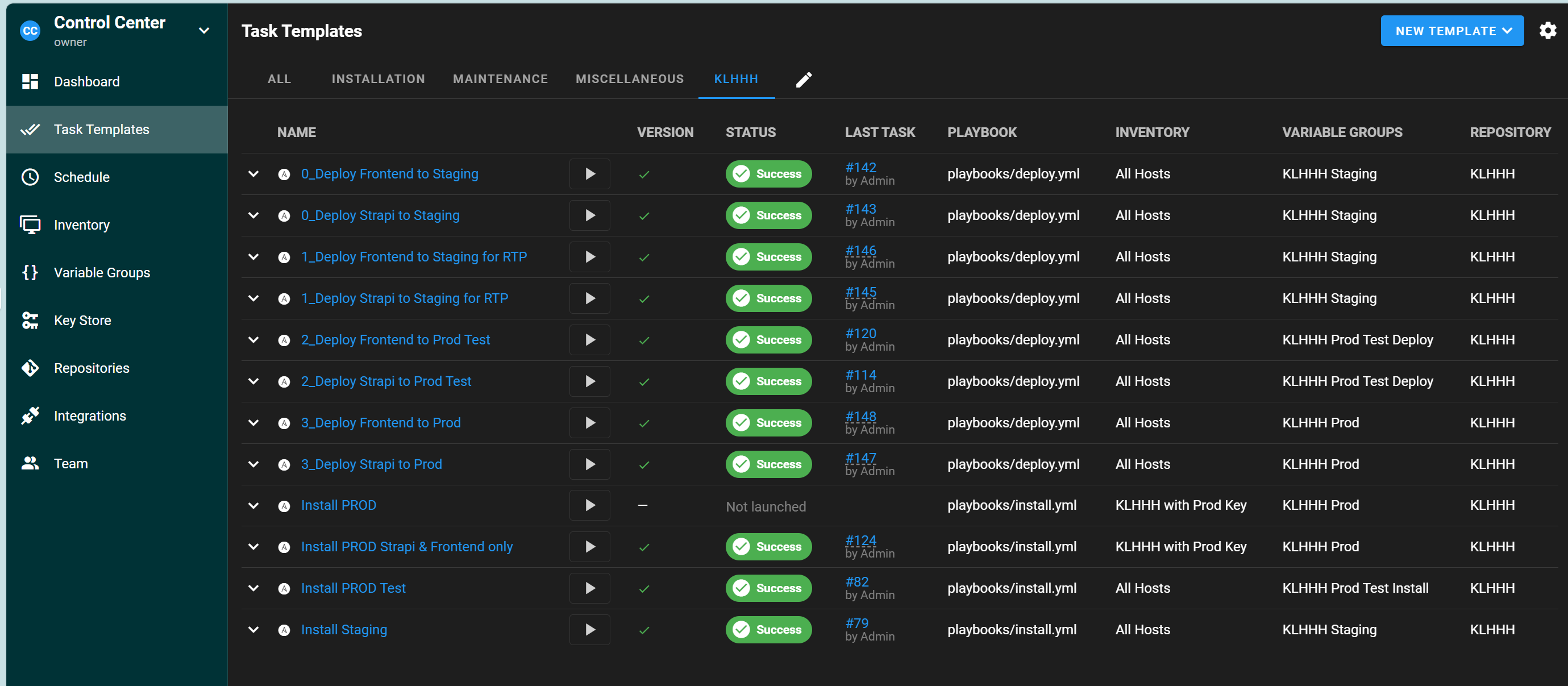
It has three plays that run in sequence.
Play structure
Play 1 — Build images on staging
          └─ Push to Docker Hub               (target=prod only)
Play 2 — Start built images on staging        (target=staging only)
Play 3 — Transfer images to prod via SSH      (target=prod only)
Required parameter
-e target=staging|prod is always required. Without it the playbook will error.
Full parameter reference
| Parameter | Default | Description |
|---|---|---|
target | (required) | staging or prod — controls URLs baked in, transfer, and restart |
build_tag | latest | Version to build. See tag behaviour table below. |
git_version | (derived) | Override the git ref directly (branch, commit, tag). Overrides build_tag. |
prod_host | klhhh-prod | Inventory hostname for the prod restart play. Override for prod-test VM. |
prod_transfer_host | (staging group_vars) | IP/hostname to SSH-transfer the image to. Override for prod-test VM. |
prod_transfer_port | (staging group_vars) | SSH port for image transfer. Override for prod-test VM. |
build_tag behaviour
| Command | Git checkout | Docker Hub push | Use case |
|---|---|---|---|
(omit build_tag) | development branch | No | Test latest dev on staging |
-e build_tag=latest | development branch | No | Same as above, explicit |
-e build_tag=1.2.7 + target=staging | v1.2.7 tag | No | Test specific version on staging |
-e build_tag=1.2.7 + target=prod | v1.2.7 tag | Yes | Production release deploy |
URL baking — how staging group_vars are overridden
When building for target=prod, the playbook's play-level vars: block overrides the staging server's group_vars so that prod URLs (not test URLs) get baked into the Vite bundle and Strapi build args:
vars:
  strapi_server_url:  https://admin.klharriettes.org
  strapi_frontend_url: https://www.klharriettes.org
  domain_name:        klharriettes.org
  strapi_api_token:   "{{ strapi_api_token_prod }}"
  vite_contact_email: committee@klharriettes.org
  vite_contact_phone: "601123226487"
When building for target=staging, these vars are not overridden — the staging group_vars apply as-is (test URLs, staging contact details).
Full Deployment Pipeline
---
title: Deployment Pipeline
config:
    look: handDrawn
---
flowchart TD

classDef dev fill:#FFE082,stroke:#FFCA28,stroke-width:2px
classDef staging fill:#BBDEFB,stroke:#1E88E5,stroke-width:2px
classDef prod fill:#A5D6A7,stroke:#43A047,stroke-width:2px
classDef action fill:#F3E5F5,stroke:#8E24AA,stroke-width:2px

A["💻 Develop on development branch"]:::dev

subgraph SIT1 ["🔵 Test — development branch on staging"]
  B1["deploy.yml -e target=staging"]:::action
  B2["Build image with staging URLs"]:::staging
  B3["Start container on staging<br/>(test.klharriettes.org)"]:::staging
  B4["Test & bugfix"]:::staging
end
style SIT1 fill:#E3F2FD,stroke:#1E88E5,stroke-width:3px

subgraph MERGE ["📦 Merge & Release"]
  C1["Squash merge development → production<br/>on GitHub"]:::dev
  C2["Prepare & publish GitHub release<br/>with tag v1.2.7"]:::dev
end
style MERGE fill:#FFF9C4,stroke:#F9A825,stroke-width:3px

subgraph SIT2 ["🔵 Test — production branch on staging"]
  CC1["deploy.yml -e target=staging<br/>-e git_version=production"]:::action
  CC2["Build production branch<br/>with staging URLs"]:::staging
  CC3["Test & verify merge"]:::staging
end
style SIT2 fill:#E3F2FD,stroke:#1E88E5,stroke-width:3px

subgraph PRODTEST ["🔵 Validate prod pipeline"]
  PT1["deploy.yml -e target=prod -e build_tag=1.2.7<br/>-e prod_host=klhhh-prod-test"]:::action
  PT2["Build with prod URLs<br/>Push to Docker Hub"]:::staging
  PT3["Transfer & start on prod-test VM"]:::staging
end
style PRODTEST fill:#E3F2FD,stroke:#1E88E5,stroke-width:3px

subgraph DEPLOY ["🟢 Deploy — Production"]
  E1["deploy.yml -e target=prod -e build_tag=1.2.7"]:::action
  E2["Transfer image to prod<br/>Restart containers"]:::prod
  E3["Smoketest production"]:::prod
end
style DEPLOY fill:#E8F5E9,stroke:#43A047,stroke-width:3px

A --> B1
B1 --> B2 --> B3 --> B4
B4 -- "Bugs found" --> A
B4 --> C1 --> C2 --> CC1 --> CC2 --> CC3
CC3 -- "Bugs found" --> A
CC3 --> PT1 --> PT2 --> PT3
PT3 -- "Bugs found" --> A
PT3 --> E1 --> E2 --> E3
E3 -- "Bugs found" --> A
Common Commands
1. Test development branch on staging
ansible-playbook playbooks/deploy.yml -e target=staging

# One service only
ansible-playbook playbooks/deploy.yml -e target=staging --tags strapi
ansible-playbook playbooks/deploy.yml -e target=staging --tags frontend
2. Test production branch on staging (after squash merge)
ansible-playbook playbooks/deploy.yml -e target=staging -e git_version=production

# One service only
ansible-playbook playbooks/deploy.yml -e target=staging -e git_version=production --tags frontend
3. Validate prod pipeline on prod-test VM
ansible-playbook playbooks/deploy.yml -e target=prod -e build_tag=1.2.7 \
  -e prod_host=klhhh-prod-test \
  -e prod_transfer_host=192.168.1.82 \
  -e prod_transfer_port=22
4. Deploy to production
# Both services
ansible-playbook playbooks/deploy.yml -e target=prod -e build_tag=1.2.7

# Independently
ansible-playbook playbooks/deploy.yml -e target=prod --tags frontend -e build_tag=1.2.7
ansible-playbook playbooks/deploy.yml -e target=prod --tags strapi  -e build_tag=1.1.8
Rollback
Rollback is a re-deploy of a previous tag. The tag exists so the playbook checks it out directly and pushes to Docker Hub:
ansible-playbook playbooks/deploy.yml -e target=prod --tags frontend -e build_tag=1.2.6Deploy a specific git ref
ansible-playbook playbooks/deploy.yml -e target=staging -e git_version=feature/my-branchFirst-Time Server Setup
1. Install server infrastructure
# Sets up infra, cloudflare, mysql, metabase, and config files.
# Strapi and frontend containers are NOT started (no image exists yet).
ansible-playbook playbooks/install.yml -e target=staging
ansible-playbook playbooks/install.yml -e target=prod
2. Initial data restore (staging)
Strapi's backup format is version-specific. If the current codebase has schema changes relative to the backup, restore must happen in two steps:
# Step 1 — deploy the last prod version (schema matches the backup)
ansible-playbook playbooks/deploy.yml -e target=staging -e build_tag=1.1.8

# Step 2 — restore the backup (Google Drive must be mounted)
ansible-playbook playbooks/restore.yml -e target=staging

# Step 3 — upgrade to current development version (runs schema migrations)
ansible-playbook playbooks/deploy.yml -e target=staging
If the codebase has no schema changes relative to the backup, skip step 1 and go straight to steps 2–3.
3. Generate staging API token
After staging Strapi is running for the first time:
- Open
https://admin-test.klharriettes.org/admin - Create an API token
- Add it to the staging vault:
ansible-vault edit inventory/group_vars/staging/vault.yml
# add: strapi_api_token_staging: <your token>- Redeploy the frontend to pick it up:
ansible-playbook playbooks/install.yml -e target=staging --tags frontend
ansible-playbook playbooks/deploy.yml -e target=staging --tags frontend
Selective Re-runs
The --tags flag works on install.yml too — useful for pushing updated config files without reinstalling everything:
# Redeploy strapi .env only
ansible-playbook playbooks/install.yml -e target=staging --tags strapi

# Redeploy mysql docker-compose only
ansible-playbook playbooks/install.yml -e target=prod --tags mysql

# Redeploy all infrastructure
ansible-playbook playbooks/install.yml -e target=staging --tags infrastructure