
SignInSheet.vue
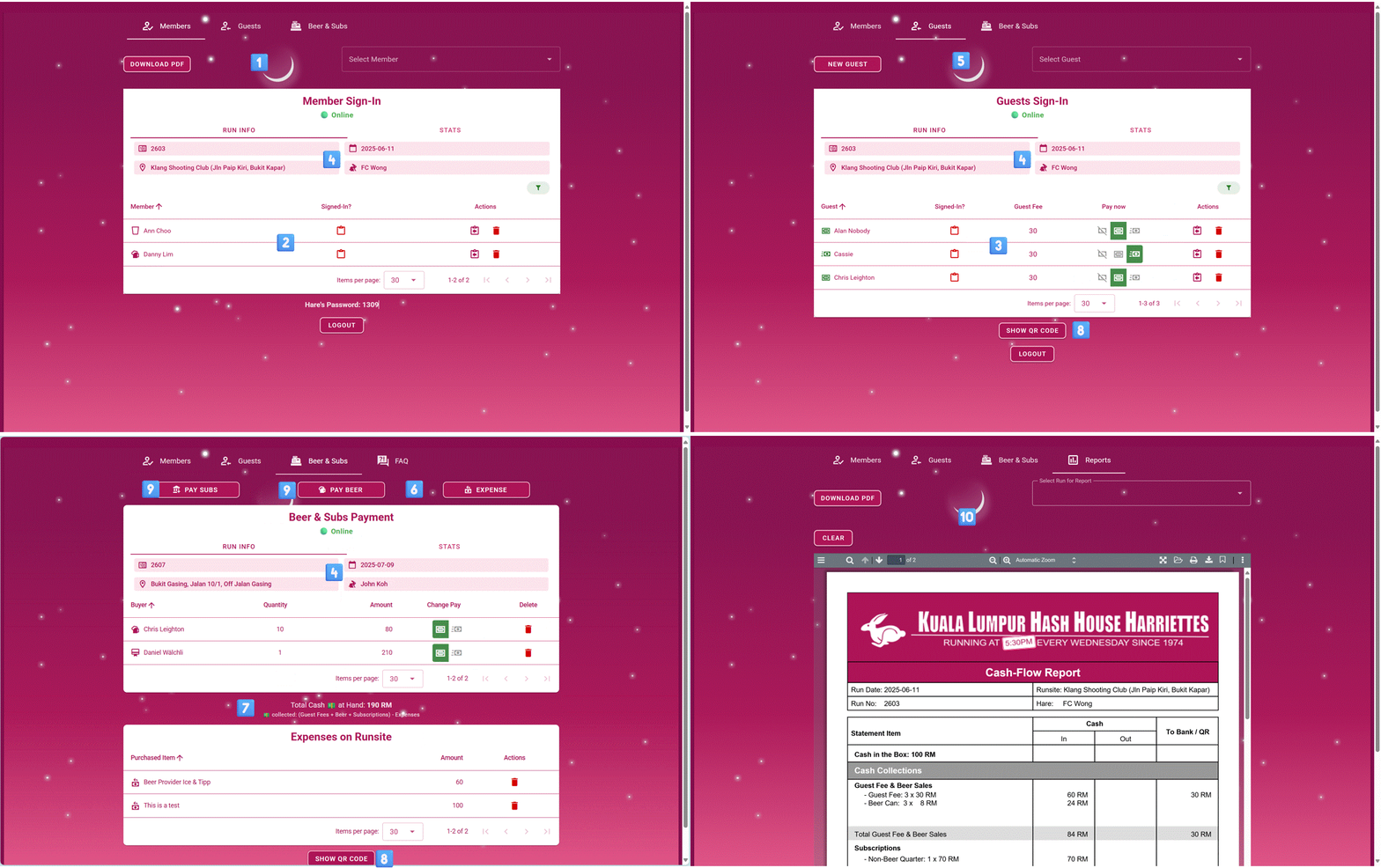
This page renders the Sign-In App (nav-item: None, only accessible by link from the Copyright Logo in the footer). Will redirect to Login page if the user is not logged in.
Used Components
- ①
MemberSignIn - ②
SignInTable - ③
SignInTableGuest - ④
SignInSheetHeader - ⑤
GuestsSignIn - ⑥
Sales - ⑦
SalesTable - ⑧
ScanQrCode - ⑨
SellItem - ⑩
Reports - ⑪
CardManagement - ⑫
RedemptionsTable
Used Stores
useConnectivityStoreuseDrinkRedemptionStoreuseCashExpensesStoreuseOnsiteSalesStoreuseSignInGuestsStoreuseSignInMembersStoreuseThisRunStore
Functions
handleVisibilityChange
Handles visibility change events on the page and evaluates the conditions for background synchronization (document visibility, online status, and no pending sync tasks). This ensures that the background synchronization process is started / stopped when the page becomes visible or hidden.
completeSync
Completes the background synchronization process for the Sign-In App. This asynchronous function logs the current time and initiates the process of fetching updated registration data from the backend, specifically for members, guests, and onsite sales associated with the current run date. The function exits early if no valid run date is available from thisRunsStore. It ensures that member and guest registration data, and onsite sales data are up-to-date by calling their respective fetch methods.
evaluateSyncConditions
Evaluates the conditions to determine if the background synchronization should be started or stopped.
The conditions are:
1. The user is online
2. There are no pending sync tasks; if we do not check this stores will be dehydrated!
3. The document is visible
If all conditions are met, the background synchronization is started. Otherwise, it is stopped.
activeRole
No description.
isValidWednesday
Checks if the given string is date string and a valid Wednesday in the format YYYY-MM-DD
Parameters:
dateString: - The date string to check
Reactivity
(anonymous) (watch)
Re-apply tab filter whenever any role flag changes (e.g. mid-session login switch).
(anonymous) (watch)
Watch for changes in connectivity conditions (isOnline and hasPendingSyncTasks) and evaluate the background sync conditions